Replicated SDK API
The Replicated SDK provides an API that you can use to embed Replicated functionality in your Helm chart application.
For example, if your application includes a UI where users manage their application instance, then you can use the /api/v1/app/updates endpoint to include messages in the UI that encourage users to upgrade when new versions are available. You could also revoke access to the application during runtime when a license expires using the /api/v1/license/fields endpoint.
For more information about how to get started with the Replicated SDK, see About the Replicated SDK.
For information about how to develop against the Replicated SDK API with mock data, see Developing Against the Replicated SDK.
app
GET /app/info
List details about an application instance, including the app name, location of the Helm chart in the Replicated OCI registry, and details about the current application release that the instance is running.
GET http://replicated:3000/api/v1/app/info
Response:
{
  "instanceID": "8dcdb181-5cc4-458c-ad95-c0a1563cb0cb",
  "appSlug": "my-app",
  "appName": "My App",
  "appStatus": "ready",
  "helmChartURL": "oci://registry.replicated.com/my-app/beta/my-helm-chart",
  "currentRelease": {
    "versionLabel": "0.1.72",
    "channelID": "2CBDxNwDH1xyYiIXRTjiB7REjKX",
    "channelName": "Beta",
    "createdAt": "2023-05-28T16:31:21Z",
    "releaseNotes": "",
    "helmReleaseName": "my-helm-chart",
    "helmReleaseRevision": 5,
    "helmReleaseNamespace": "my-helm-chart"
  },
  "channelID": "2CBDxNwDH1xyYiIXRTjiB7REjKX",
  "channelName": "Beta",
  "channelSequence": 4,
  "releaseSequence": 30
}
GET /app/status
List details about an application status, including the list of individual resource states and the overall application state.
GET http://replicated:3000/api/v1/app/status
Response:
{
  "appStatus": {
    "appSlug": "my-app",
    "resourceStates": [
      {
        "kind": "deployment",
        "name": "api",
        "namespace": "default",
        "state": "ready"
      }
    ],
    "updatedAt": "2024-12-19T23:01:52.207162284Z",
    "state": "ready",
    "sequence": 268
  }
}
GET /app/updates
List details about the releases that are available to an application instance for upgrade, including the version label, created timestamp, and release notes.
GET http://replicated:3000/api/v1/app/updates
Response:
[
  {
    "versionLabel": "0.1.15",
    "createdAt": "2023-05-12T15:48:45.000Z",
    "releaseNotes": "Awesome new features!"
  }
]
GET /app/history
List details about the releases that an application instance has installed previously.
GET http://replicated:3000/api/v1/app/history
Response:
{
  "releases": [
    {
      "versionLabel": "0.1.70",
      "channelID": "2CBDxNwDH1xyYiIXRTjiB7REjKX",
      "channelName": "Stable",
      "createdAt": "2023-05-12T17:43:51Z",
      "releaseNotes": "",
      "helmReleaseName": "echo-server",
      "helmReleaseRevision": 2,
      "helmReleaseNamespace": "echo-server-helm"
    }
  ]
}
POST /app/custom-metrics
Send custom application metrics. For more information and examples see Configure Custom Metrics.
PATCH /app/custom-metrics
Send partial custom application metrics for upserting.
PATCH http://replicated:3000/api/v1/app/custom-metrics
Request:
{
  "data": {
    "numProjects": 20,
  }
}
Response: Status 200 OK
DELETE /app/custom-metrics/{metric_name}
Delete an application custom metric.
DELETE http://replicated:3000/api/v1/app/custom-metrics/numProjects
Response: Status 204 No Content
POST /app/instance-tags
Programmatically set new instance tags or overwrite existing tags. Instance tags are key-value pairs, where the key and the value are strings.
Setting a tag with the name key will set the instance's name in the vendor portal.
The force parameter defaults to false. If force is false, conflicting pre-existing tags will not be overwritten and the existing tags take precedence. If the force parameter is set to true, any conflicting pre-existing tags will be overwritten.
To delete a particular tag, set the key's value to an empty string "".
POST http://replicated:3000/api/v1/app/instance-tags
Request:
{
  "data": {
    "force": false,
    "tags": {
      "name": "my-instance-name",
      "preExistingKey": "will-not-be-overwritten",
      "cpuCores": "10",
      "supportTier": "basic"
    }
  }
}
Response: Status 200 OK
supportbundle
POST /supportbundle
Upload a support bundle through the SDK. The bundle is streamed to Replicated for analysis and is available in the Vendor Portal.
Requirements:
- Replicated SDK 1.17.1 or later
- The environment must have outbound internet access
- The request must include the
Content-Lengthheader
POST http://replicated:3000/api/v1/supportbundle
Content-Type: application/gzip
Content-Length: <bundle-size-in-bytes>

<binary support bundle data>
Response: Status 201 Created
{
  "bundleId": "abc123-def456",
  "slug": "my-app-supportbundle-abc123"
}
POST /supportbundle/metadata
Set support bundle metadata (key-value pairs) by replacing any existing metadata.
The SDK stores metadata as top-level keys in a Kubernetes secret named replicated-support-metadata in the SDK namespace. You can use the supportBundleMetadata collector to include this metadata in support bundles. For more information about this collector, see Support Bundle Metadata in the Troubleshoot documentation.
POST http://replicated:3000/api/v1/supportbundle/metadata
Request:
{
  "data": {
    "key1": "value1",
    "key2": "value2"
  }
}
Response: Status 200 OK
PATCH /supportbundle/metadata
Merge support bundle metadata (key-value pairs) with any existing metadata. PATCH /supportbundle/metadata adds new keys and updates existing keys. It preserves any keys excluded from the request.
The SDK stores metadata as top-level keys in a Kubernetes secret named replicated-support-metadata in the SDK namespace. You can use the supportBundleMetadata collector to include this metadata in a support bundle. For more information about this collector, see Support Bundle Metadata in the Troubleshoot documentation.
PATCH http://replicated:3000/api/v1/supportbundle/metadata
Request:
{
  "data": {
    "key3": "value3"
  }
}
Response: Status 200 OK
license
GET /license/info
List details about the license that was used to install, including the license ID, type, the customer name, and the channel the customer is assigned.
GET http://replicated:3000/api/v1/license/info
Response:
{
  "licenseID": "YiIXRTjiB7R...",
  "appSlug": "my-app",
  "channelID": "2CBDxNwDH1xyYiIXRTjiB7REjKX",
  "channelName": "Stable",
  "customerName": "Example Customer",
  "customerEmail": "username@example.com",
  "licenseType": "dev",
  "licenseSequence": 1,
  "isAirgapSupported": false,
  "isGitOpsSupported": false,
  "isIdentityServiceSupported": false,
  "isGeoaxisSupported": false,
  "isSnapshotSupported": false,
  "isSupportBundleUploadSupported": false,
  "isSemverRequired": true,
  "endpoint": "https://replicated.app",
  "entitlements": {
    "expires_at": {
      "title": "Expiration",
      "description": "License Expiration",
      "value": "",
      "valueType": "String"
    },
    "numSeats": {
      "title": "Number of Seats",
      "value": 10,
      "valueType": "Integer"
    }
  }
}
GET /license/fields
List details about all the fields in the license that was used to install, including the field names, descriptions, values, and signatures.
GET http://replicated:3000/api/v1/license/fields
Response:
{
  "expires_at": {
    "name": "expires_at",
    "title": "Expiration",
    "description": "License Expiration",
    "value": "2023-05-30T00:00:00Z",
    "valueType": "String",
    "signature": {
      "v1": "Vs+W7+sF0RA6UrFEJcyHAbC5YCIT67hdsDdqtJTRBd4ZitTe4pr1D/SZg2k0NRIozrBP1mXuTgjQgeI8PyQJc/ctQwZDikIEKFW0sVv0PFPQV7Uf9fy7wRgadfUxkagcCS8O6Tpcm4WqlhEcgiJGvPBki3hZLnMO9Ol9yOepZ7UtrUMVsBUKwcTJWCytpFpvvOLfSNoHxMnPuSgpXumbHZjvdXrJoJagoRDXPiXXKGh02DOr58ncLofYqPzze+iXWbE8tqdFBZc72lLayT1am3MN0n3ejCNWNeX9+CiBJkqMqLLkjN4eugUmU/gBiDtJgFUB2gq8ejVVcohqos69WA=="
    }
  },
  "numSeats": {
    "name": "numSeats",
    "title": "Number of Seats",
    "value": 10,
    "valueType": "Integer",
    "signature": {
      "v1": "UmsYlVr4+Vg5TWsJV6goagWUM4imdj8EUUcdau7wIzfcU0MuZnv3UNVlwVE/tCuROCMcbei6ygjm4j5quBdkAGUyq86BCtohg/SqRsgVoNV6BN0S+tnqJ7w4/nqRVBc2Gsn7wTYNXiszLMkmfeNOrigLgsrtaGJmZ4IsczwI1V5Tr+AMAgrACL/UyLg78Y6EitKFW4qvJ9g5Q8B3uVmT+h9xTBxJFuKTQS6qFcDx9XCu+bKqoSmJDZ8lwgwpJDAiBzIhxiAd66lypHX9cpOg5A7cKEW+FLdaBKQdNRcPHQK2O9QwFj/NKEeCJEufuD3OeV8MSbN2PCehMzbj7tXSww=="
    }
  }
}
GET /license/fields/{field_name}
List details about one of the fields in the license that was used to install, including the field name, description, value, and signature.
GET http://replicated:3000/api/v1/license/fields/\{field_name\}
Example request:
curl replicated:3000/api/v1/license/fields/expires_at
Response:
{
  "name": "expires_at",
  "title": "Expiration",
  "description": "License Expiration",
  "value": "2023-05-30T00:00:00Z",
  "valueType": "String",
  "signature": {
    "v1": "c6rsImpilJhW0eK+Kk37jeRQvBpvWgJeXK2MD0YBlIAZEs1zXpmvwLdfcoTsZMOj0lZbxkPN5dPhEPIVcQgrzfzwU5HIwQbwc2jwDrLBQS4hGOKdxOWXnBUNbztsHXMqlAYQsmAhspRLDhBiEoYpFV/8oaaAuNBrmRu/IVAW6ahB4KtP/ytruVdBup3gn1U/uPAl5lhzuBifaW+NDFfJxAXJrhdTxMBxzfdKa6dGmlGu7Ou/xqDU1bNF3AuWoP3C78GzSBQrD1ZPnu/d+nuEjtakKSX3EK6VUisNucm8/TFlEVKUuX7hex7uZ9Of+UgS1GutQXOhXzfMZ7u+0zHXvQ=="
  }
}
Integration
GET /api/v1/integration/status
Get status of Development Mode. When this mode is enabled, the app API will use mock data. This value cannot be set programmatically. It is controlled by the installed license.
{
  "isEnabled": true
}
GET /api/v1/integration/mock-data
Get mock data that is used when Development Mode is enabled.
{
  "appStatus": "ready",
  "helmChartURL": "oci://registry.replicated.com/dev-app/dev-channel/dev-parent-chart",
  "currentRelease": {
    "versionLabel": "0.1.3",
    "releaseNotes": "release notes 0.1.3",
    "createdAt": "2023-05-23T20:58:07Z",
    "deployedAt": "2023-05-23T21:58:07Z",
    "helmReleaseName": "dev-parent-chart",
    "helmReleaseRevision": 3,
    "helmReleaseNamespace": "default"
  },
  "deployedReleases": [
    {
      "versionLabel": "0.1.1",
      "releaseNotes": "release notes 0.1.1",
      "createdAt": "2023-05-21T20:58:07Z",
      "deployedAt": "2023-05-21T21:58:07Z",
      "helmReleaseName": "dev-parent-chart",
      "helmReleaseRevision": 1,
      "helmReleaseNamespace": "default"
    },
    {
      "versionLabel": "0.1.2",
      "releaseNotes": "release notes 0.1.2",
      "createdAt": "2023-05-22T20:58:07Z",
      "deployedAt": "2023-05-22T21:58:07Z",
      "helmReleaseName": "dev-parent-chart",
      "helmReleaseRevision": 2,
      "helmReleaseNamespace": "default"
    },
    {
      "versionLabel": "0.1.3",
      "releaseNotes": "release notes 0.1.3",
      "createdAt": "2023-05-23T20:58:07Z",
      "deployedAt": "2023-05-23T21:58:07Z",
      "helmReleaseName": "dev-parent-chart",
      "helmReleaseRevision": 3,
      "helmReleaseNamespace": "default"
    }
  ],
  "availableReleases": [
    {
      "versionLabel": "0.1.4",
      "releaseNotes": "release notes 0.1.4",
      "createdAt": "2023-05-24T20:58:07Z",
      "deployedAt": "2023-05-24T21:58:07Z",
      "helmReleaseName": "",
      "helmReleaseRevision": 0,
      "helmReleaseNamespace": ""
    },
    {
      "versionLabel": "0.1.5",
      "releaseNotes": "release notes 0.1.5",
      "createdAt": "2023-06-01T20:58:07Z",
      "deployedAt": "2023-06-01T21:58:07Z",
      "helmReleaseName": "",
      "helmReleaseRevision": 0,
      "helmReleaseNamespace": ""
    }
  ]
}
POST /api/v1/integration/mock-data
Programmatically set mock data that is used when Development Mode is enabled. The payload will overwrite the existing mock data. Any data that is not included in the payload will be removed. For example, to remove release data, simply include empty arrays:
POST http://replicated:3000/api/v1/integration/mock-data
Request:
{
  "appStatus": "ready",
  "helmChartURL": "oci://registry.replicated.com/dev-app/dev-channel/dev-parent-chart",
  "currentRelease": {
    "versionLabel": "0.1.3",
    "releaseNotes": "release notes 0.1.3",
    "createdAt": "2023-05-23T20:58:07Z",
    "deployedAt": "2023-05-23T21:58:07Z",
    "helmReleaseName": "dev-parent-chart",
    "helmReleaseRevision": 3,
    "helmReleaseNamespace": "default"
  },
  "deployedReleases": [],
  "availableReleases": []
}
Response: Status 201 Created
Examples
This section provides example use cases for the Replicated SDK API.
Support Update Checks in Your Application
The api/v1/app/updates endpoint returns details about new releases that are available to an instance for upgrade. You could use the api/v1/app/updates endpoint to allow your users to easily check for available updates from your application.
Additionally, to make it easier for users to upgrade to new versions of your application, you could provide customer-specific upgrade instructions in your application by injecting values returned by the /api/v1/license/info and /api/v1/app/info endpoints.
The following examples show how you could include a page in your application that lists available updates and also provides customer-specific upgrade instructions:
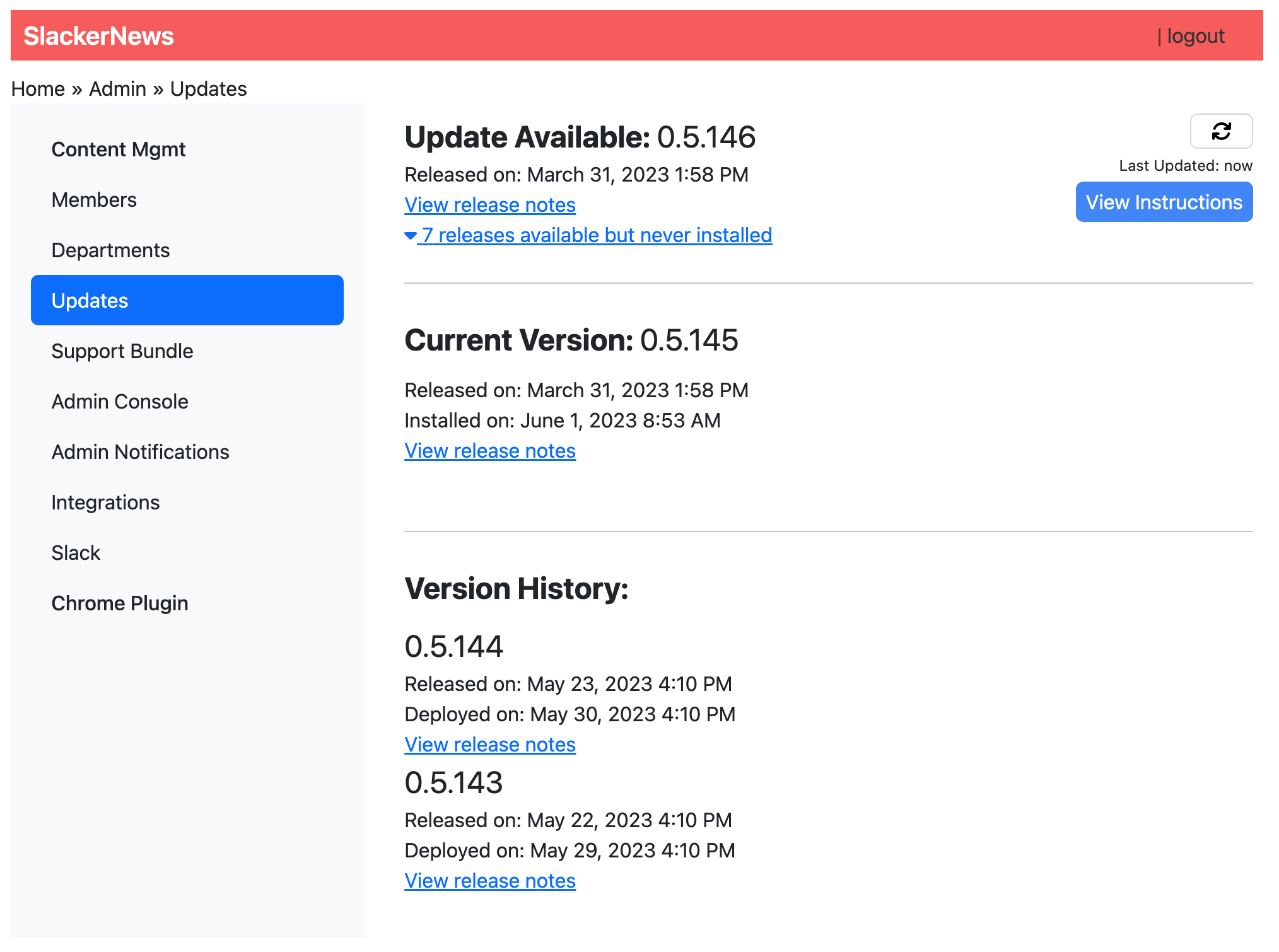 View a larger version of this image
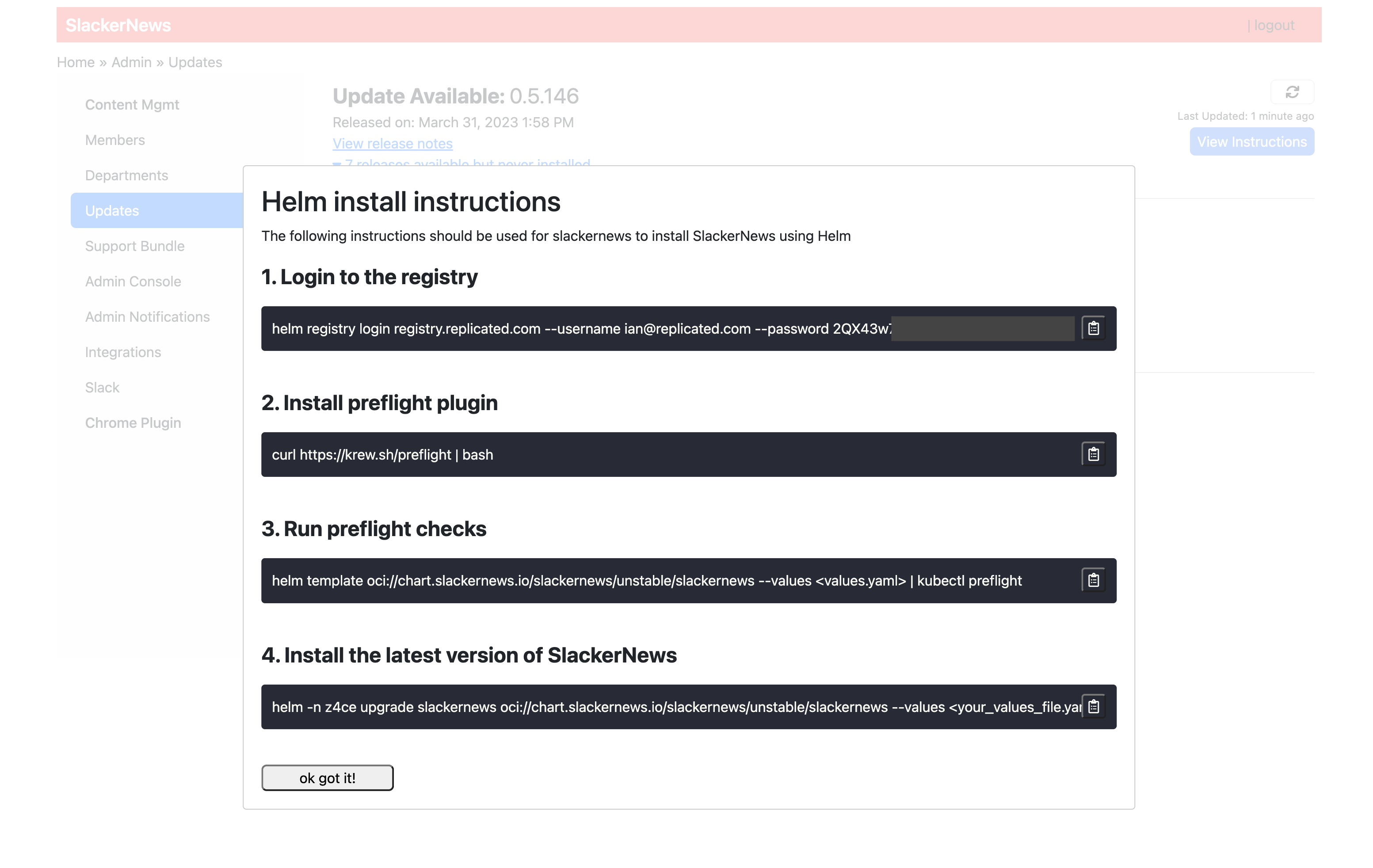 View a larger version of this image
To use the SDK API to check for available application updates and provide customer-specific upgrade instructions:
-
From your application, call the
api/v1/app/updatesendpoint to return available updates for the application instance. Use the response to display available upgrades for the customer.curl replicated:3000/api/v1/app/updatesExample response:
[{"versionLabel": "0.1.15","createdAt": "2023-05-12T15:48:45.000Z","releaseNotes": "Awesome new features!"}] -
For each available release, add logic that displays the required upgrade commands with customer-specific values. To upgrade, users must first run
helm registry loginto authenticate to the Replicated registry. Then, they can runhelm upgrade:- Inject customer-specific values into the
helm registry logincommand:
helm registry login REGISTRY_DOMAIN --username EMAIL --password LICENSE_IDThe
helm registry logincommand requires the following components:-
REGISTRY_DOMAIN: The domain for the registry where your Helm chart is pushed. The registry domain is eitherreplicated.registry.comor a custom domain that you added. -
EMAIL: The customer email address is available from the/api/v1/license/infoendpoint in thecustomerEmailfield. -
LICENSE_IDThe customer license ID is available from the/api/v1/license/infoendpoint in thelicenseIDfield.
-
Inject customer-specific values into the
helm upgradecommand:helm upgrade -n NAMESPACE RELEASE_NAME HELM_CHART_URLThe following describes where the values in the
helm upgradecommand are available:-
NAMESPACE: The release namespace is available from the/api/v1/app/infoendpoint in thecurrentRelease.helmReleaseNamespace -
RELEASE_NAME: The release name is available from the/api/v1/app/infoendpoint in thecurrentRelease.helmReleaseNamefield. -
HELM_CHART_URL: The URL of the Helm chart at the OCI registry is available from the/api/v1/app/infoendpoint in thehelmChartURLfield.
-
- Inject customer-specific values into the
Automate Support Bundle Collection and Upload
You can use the support bundle SDK API endpoints to build an automated support workflow directly into your application. This lets your application attach structured metadata to support bundles, upload them programmatically, and enable your team to receive and process them without requiring customers to manually transfer files.
For more information about enabling direct bundle uploads, see Enable Support Bundle Uploads.
To automate support bundle collection and upload from your application:
-
From your application, use the
PATCH /api/v1/supportbundle/metadataendpoint to attach contextual metadata before a bundle is generated. This metadata is included in the bundle automatically when you use thesupportBundleMetadatacollector in your support bundle spec. For more information about this collector, see Support Bundle Metadata in the Troubleshoot documentation.curl -X PATCH replicated:3000/api/v1/supportbundle/metadata \-H "Content-Type: application/json" \-d '{"data": {"severity": "error","ticketId": "SUPPORT-1234","environment": "production","component": "ingestion-pipeline"}}'PATCHmerges new keys with any existing metadata. UsePOST /api/v1/supportbundle/metadatainstead if you want to replace all existing metadata.noteYour application can call this endpoint at any time to keep metadata current. For example, you might update the
severityorticketIdfields when a user opens a support request from your application's UI, so that the next bundle collected includes that context. -
After collecting a support bundle (for example, using the support-bundle kubectl plugin), use the
POST /api/v1/supportbundleendpoint to upload it through the SDK. The bundle is streamed to Replicated and becomes available under the Troubleshoot tab in the Vendor Portal.curl -X POST replicated:3000/api/v1/supportbundle \-H "Content-Type: application/gzip" \-H "Content-Length: $(wc -c < bundle.tar.gz)" \--data-binary @bundle.tar.gzExample response:
{"bundleId": "abc123-def456","slug": "my-app-supportbundle-abc123"}The
bundleIdin the response identifies the bundle for retrieval through the Vendor API.noteThe upload endpoint requires Replicated SDK 1.17.1 or later, outbound internet access, and the
Content-Lengthheader. -
(Optional) To automate what happens after a bundle is uploaded, configure notification events for Support Bundle Uploaded or Support Bundle Analyzed. These events can trigger webhooks to route bundles to your support tools (such as Zendesk or ServiceNow) based on the metadata your application attached.
For more information about configuring these events, see Support Events.
-
To retrieve bundle details and analysis results programmatically from the vendor side, use the Vendor API v3 support bundle endpoints with the
bundleIdfrom the upload response:curl -H "Authorization: $REPLICATED_API_TOKEN" \"https://api.replicated.com/vendor/v3/supportbundle/$BUNDLE_ID"To download the bundle file:
curl -L -H "Authorization: $REPLICATED_API_TOKEN" \"https://api.replicated.com/vendor/v3/supportbundle/$BUNDLE_ID/download" \-o bundle.tar.gz
Revoke Access at Runtime When a License Expires
You can use the Replicated SDK API /api/v1/license/fields/{field_name} endpoint to revoke a customer's access to your application during runtime when their license expires.
To revoke access to your application when a license expires:
-
In the vendor portal, click Customers. Select the target customer and click the Manage customer tab. Alternatively, click + Create customer to create a new customer.
-
Under Expiration policy:
-
Enable Customer's license has an expiration date.
-
For When does this customer expire?, use the calendar to set an expiration date for the license.
-
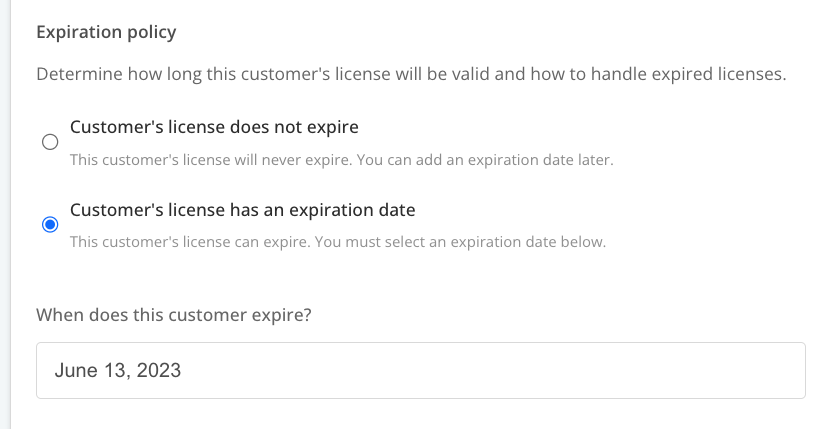
View a larger version of this image
-
Install the Replicated SDK as a standalone component in your cluster. This is called integration mode. Installing in integration mode allows you to develop locally against the SDK API without needing to create releases for your application in the vendor portal. See Develop Against the SDK API.
-
In your application, use the
/api/v1/license/fields/expires_atendpoint to get theexpires_atfield that you defined in the previous step.Example:
curl replicated:3000/api/v1/license/fields/expires_at{"name": "expires_at","title": "Expiration","description": "License Expiration","value": "2023-05-30T00:00:00Z","valueType": "String","signature": {"v1": "c6rsImpilJhW0eK+Kk37jeRQvBpvWgJeXK2M..."}} -
Add logic to your application to revoke access if the current date and time is more recent than the expiration date of the license.
-
(Recommended) Use signature verification in your application to ensure the integrity of the license field. See Verify License Field Signatures with the Replicated SDK API.